
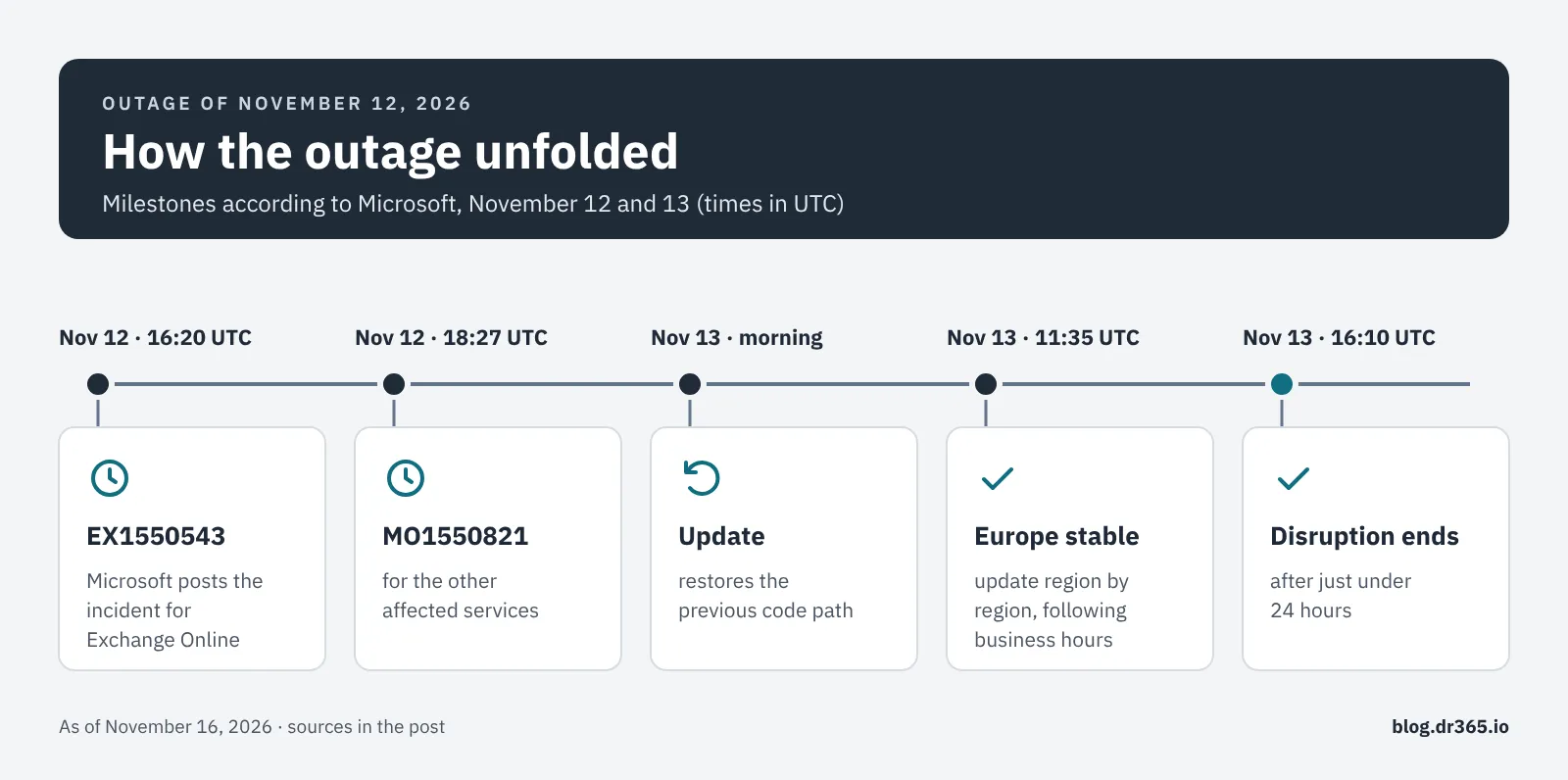
On Thursday, November 12, 2026, organizations around the world lost access to their mailboxes. At 16:20 UTC, Microsoft posted incident EX1550543 for Exchange Online to the Service Health Dashboard; MO1550821 followed at 18:27 for the other affected services. According to Microsoft's preliminary post-incident report, besides Exchange Online the impact reached Copilot, Teams, SharePoint, OneDrive, Defender, Purview, Fabric, Intune, Planner, Power Apps, To Do, Power BI and Universal Print, mostly where they rely on Exchange Online. The disruption ended on November 13 at 16:10 UTC, so it lasted just under 24 hours. Early on November 14, after a monitoring period, Microsoft closed both incidents.
Since then, the usual debate about dependency and digital sovereignty has been running. In its current form, I think it's overblown. A comparable outage can hit a network carrier, an identity provider or any other large SaaS provider, and it already has: the faulty CrowdStrike update in July 2024 and the AWS outage in October 2025 showed that. For operators, a different question is more useful: can your organization work for a day without its most important platform, and do you know what to do afterwards?
Updated November 16, 2026
Microsoft published a preliminary post-incident report on November 15. The sections on the timeline and the cause are now based on it. The final report is due by November 20 and may still change details. The NIS2 section isn't legal advice.
What the preliminary report says
Microsoft names three factors that only caused the outage in combination. The component that failed was the networking gateway that sits in front of many Microsoft 365 services.
- A dormant defect. A fix Microsoft had built specifically for the gateway servers caused lock contention in an internal Windows process under certain load. CPU and memory ran out and the servers stopped responding. The fix started rolling out in July and ran worldwide for more than three months without issues. Load testing used weaker hardware with fewer cores, while the problem gets worse on newer hardware with many cores. According to Microsoft, neither the defect nor the fix applies to other Windows deployments.
- More load from a routine failover. Microsoft runs two independent gateway systems. About 15 hours before the outage, Teams automatically failed over from the alternative gateway to the primary one, which also carries Exchange Online. That's normal, but it raised the load and changed the traffic pattern.
- Less capacity. Close to 14 percent of the gateway servers were out of service because of an unrelated issue from the previous day. On its own, that was harmless.
During peak hours in the US, the first servers tipped over. Automatic redirection to healthy endpoints spread the same load across fewer and fewer servers and kept the cascade going. In less than two hours the whole fleet was affected; at the low point, more than 80 percent of the servers were unresponsive. The partitioning between capacity units and regions that should contain this kind of failure didn't hold because of a separate issue. That's why the outage went global.
This also explains why Teams chats and online meetings largely kept working: Teams, OneDrive, SharePoint and the Office apps could move off to other infrastructure. Exchange Online can't, for scale reasons, Microsoft says. Recovery took long because restarted servers were immediately swamped by queued traffic, and automated recovery wasn't designed for that state. Because the defect was months old, rollback and feature flags didn't help either. On the morning of November 13, Microsoft started deploying an update that restored the previous code path, first to part of the servers, then region by region following business hours. Europe was stable again at 11:35 UTC. Mail to affected mailboxes was delayed, not rejected; Microsoft extended the delivery window to make sure of that.
My guess, and how it held up
On November 14, I guessed at an organizational trigger here: a change that didn't behave as planned, or a certificate that wasn't rotated in time. I was wrong about the certificate. About the change, I was half right: it did start with a fix, but one that had been running quietly since July and only became a problem through a rare mix of load and missing capacity.
That's the more uncomfortable version. A bad change from yesterday shows up in the change log and gets reverted. A defect that sleeps for three months slips past every review, and the usual ways back no longer work. The same applies to your own tenant: when something breaks, look at changes from the last few months, not just the last few days.
Lessons learned for your own operations
Look at dependencies, not applications
Many business impact analyses list applications: email, Teams, SharePoint. This outage showed that's too coarse. When Exchange Online went down, Teams calendars, parts of Copilot, Defender and Purview and even pages of the admin center were affected too (On-Site Technology). A BIA should record which processes depend on which service and account for dependencies between services. The question then isn't "what happens without email?" but "what happens when mailboxes and calendars are gone at the same time, but chat works?"

Check where your redundancy converges
The report shows a pattern you'll find in your own operations too: the mechanisms meant to prevent outages made this one worse. The Teams failover added load to exactly the gateway Exchange Online depends on, and automatic redirection carried the failure from server to server. So ask where your own redundancies share something: two internet lines from the same carrier, two sites behind the same proxy, an emergency channel you sign in to with your Microsoft 365 account. Redundancy that falls back onto the same component in an emergency only protects you against the case that doesn't happen.
Emergency communication outside the tenant
When the admin center itself is affected, you need other sources: Microsoft's public status page, the status updates on X, and a communication channel that doesn't depend on the tenant. If you assumed the crisis meeting would run over Teams if needed, you got lucky this time, because meetings largely worked. Next time it may be the other way round. A channel outside Microsoft 365, tested beforehand, is part of the basics for me, as I wrote in the NIS2 post.
Change nothing during a provider incident
Microsoft paused all ongoing and planned deployments and configuration changes during the incident. The same rule applies to your own tenant: while a provider incident is ongoing, don't touch Outlook profiles, transport rules or Conditional Access just because something isn't working. Reconfigure in a hurry and you'll have two problems afterwards. Put this rule in the operations manual.
Inventory your own certificates and secrets
It wasn't a certificate this time. Still, in customer tenants I see far more outages caused by expired client secrets on app registrations, SAML certificates for single sign-on or connector certificates than by Microsoft. An inventory with expiry dates, owners and a reminder with lead time is cheap and prevents exactly the kind of outage that's hardest to explain afterwards.
NIS2: report or not?
Under NIS2, a security incident isn't limited to attacks. It also covers events that impair availability. What has to be reported under section 32 of the German BSI Act is a significant incident, one that has caused or could cause severe operational disruption or financial loss for you (section 2 BSIG). Whether a provider outage meets that bar for you depends on what came to a standstill in your organization and for how long.
Three points help with the assessment:
- The clock starts when you become aware. The early warning is due within 24 hours at the latest. For an overnight outage, the assessment has to be done the next morning.
- The question about intent can be answered. The early warning asks whether unlawful or malicious action is suspected. Microsoft said during the incident that there was no indication of it, and the preliminary report names a software defect as the cause.
- "Not reporting" is a decision too. Record who decided not to report, when, and why. That's exactly what an auditor will ask later.
Then there's the supply chain under section 30 BSIG. For incidents with broad impact, Microsoft delivers a preliminary post-incident report within 48 hours and a final one within five business days through Service health in the admin center (Microsoft Learn). Both belong in the supplier file, together with your assessment of whether they change anything about your measures. Download them soon: Service health history only goes back 30 days (Microsoft Learn).
Clean up after the outage
During an outage, users find ways to keep working: private email addresses, messengers, files shared via Anyone links or external services, guests invited in a hurry. That's understandable, but it leaves traces. After the outage, check sharing reports and the audit log for new Anyone links, external shares and guests from that period, and revoke what shouldn't stay. Several voices in the community have pointed this out in recent days.
Five things to check tomorrow
- Go through your business impact analysis and add which processes depend on mailboxes and calendars, not just "email".
- Test the emergency channel outside Microsoft 365: who's in it, who can start it, when was it last used, and does it need an account from your tenant?
- Add the rule "no changes during a provider incident" to the operations manual.
- Export app registrations with the expiry dates of their secrets and certificates, and assign owners.
- Document the NIS2 reporting decision for November 12, download the preliminary post-incident report from Service health, and add the final one once it's out.
Sources
- Microsoft: Preliminary Post Incident Report EX1550543/MO1550821, November 15, 2026 (Microsoft 365 admin center under Health > Service health, admins only)
- Service health and continuity (Microsoft Learn)
- How to check Microsoft 365 service health (Microsoft Learn)
- Microsoft 365 outage Nov 2026: what broke and why (systemdesign.academy)
- Microsoft 365 Outage, November 12, 2026: What Is Down and the Timeline (On-Site Technology)
- Microsoft 365 outage, 12 November 2026: what happened and what admins can do (azureblog.co.uk)
- Microsoft 365 and Exchange Online Outage (12 November 2026): What It Means for Email Senders (Postbox Services)
- Massive Microsoft 365 outage disrupts Outlook, Teams, Copilot worldwide (BleepingComputer)
- German BSI Act: section 2, section 30, section 32 (gesetze-im-internet.de)