
If you have been following the Message Center and the changes on Microsoft Learn over the past few days, a pattern emerges. Consecutive interpretation in Teams consumes Copilot Credits. AI triage of voicemail requires usage-based billing. Apps on Copilot Managed Runtime are charged per API call. And the list of services billed through Copilot Credits has grown to almost twenty entries. None of these announcements is remarkable on its own. Taken together, they mean this: a Copilot tenant without well-designed spending policies has no cost problem as long as nobody turns on billing. Once billing is active, the defaults decide your budget. This post sorts out what has changed, which settings matter, and how I would build spending policies into a tenant blueprint.
Two billing worlds
Microsoft now draws a clear line between two models (Microsoft Learn):
- User Subscription License (USL): the per-user Copilot license. It covers everyday AI work at a fixed price.
- Usage-based billing (UBB): consumption-based billing for agentic work that needs more time, more compute, or specialized models. It is charged in Copilot Credits. According to Microsoft, these experiences still require a USL.
The currency itself is simple: in the pay-as-you-go model, one US dollar buys 100 Copilot Credits (Microsoft Learn). The hard part is knowing what consumes credits and who gets to decide.
What is billed in credits today
The overview on Microsoft Learn currently lists these services as usage-based (Microsoft Learn):
- Cowork, Copilot Code and Autopilot
- Advanced work in SharePoint and OneDrive
- Work IQ API for your own apps and agents, plus Copilot Agents with Work IQ
- Copilot Managed Runtime
- Usage-billed models in Copilot Chat and Office
- Teams Phone Agent, consecutive interpretation and Intelligent Call Delegation in Teams
- Copilot Studio, Contact Center Intelligence, Windows 365 Agent, Opal and video creation in Clipchamp
On top of that comes automatic voicemail triage (Frontier). Personal voicemail needs a Copilot license plus usage-based billing; shared voicemail for call queues only needs usage-based billing. It is currently limited to tenants whose tenant language is English (Microsoft Learn).
Microsoft states that more agents and services will be added. That is the part governance needs to care about.
The setting you need to know: Auto-apply new services
Spending policies in the Microsoft 365 admin center have a setting called Auto-apply new services, and it is on by default. When Microsoft enables a new service for usage-based billing, it is added automatically to every policy where this setting is active. Microsoft explicitly recommends reviewing existing policies and turning the setting off for any policy that should not cover future services automatically (Microsoft Learn).
Here is how that plays out. The Teams policy setting -AIInterpreter, which controls interpretation in meetings, is enabled by default and covers both modes. Consecutive interpretation is billed against the organizer's spending policy (Microsoft Learn). If a tenant has a broad policy with auto-apply on, every covered organizer with a Copilot license can use the feature as soon as it ships, without anyone ever having made a conscious decision. Whether that is what you want is up to your organization. The question just needs to be asked first.
Added in November
How fast the list grows shows in three announcements from this month alone:
- Video creation in Clipchamp: Copilot creates videos from prompts or documents in Clipchamp Video Hub, currently in Frontier Public. Every video and every refinement consumes credits. Prerequisites are enabled Anthropic models and a spending policy that covers the user (MC1560920). On top of that comes an app policy, "Turn off Clipchamp AI video project", in the Microsoft 365 Apps policy management (MC1518034).
- Opal: Since November 9, Opal requires usage-based billing, in addition to Copilot, Intune and Entra ID P1 licenses (Microsoft Learn).
- GPT-6.2 Sol and Astra: Astra is usage-billed in Cowork and Copilot Studio; in Word, Excel, PowerPoint and Chat it is only available in Frontier for now. Sol is also billed in credits in Cowork and Copilot Studio, but in Word, Excel, PowerPoint and Chat it comes as part of the Copilot license with usage limits (MC1560916).
The last example shows how confusing this gets: the same model costs nothing extra in one app and credits in another. If you want to tell users what a request costs, you need an overview per service, not per model. And with auto-apply on, every one of these services lands in your existing policies without anyone being asked.
Copilot Managed Runtime as an example
Copilot Managed Runtime shows how granular billing has become (Microsoft Learn):
- Building and running are billed separately. Building an app in Cowork or Copilot Code consumes credits through the builder's own spending policy. In Copilot Studio, credits come from the environment. Building with the CLI is free.
- Running requires coverage for every user: either a Power Apps Premium license or a spending policy that includes Copilot Managed Runtime. The charge is 0.1 credits per API call. Every script, stylesheet or image loaded at startup counts as a call, as does every data access through a connector or to Dataverse.
- What is not enough: the Power Apps use rights included in Microsoft 365 E3 or E5 do not cover Managed Runtime apps, and neither does a Copilot license on its own. Sharing an app gives recipients access, not a license.
The amounts are small. For a team tracker with 25 users, Microsoft estimates 1,210 to 2,200 credits per month, roughly 12 to 22 US dollars. Specialized services such as the Work IQ APIs are billed on top. If Fabric is used as the database backend, you also need a Fabric license, and the backend consumes credits too (Microsoft Learn). Dennis Chi ran the numbers in his analysis and concludes that for lightweight apps the Fabric backend can be the largest share of the cost (recursion.no).
So the real risk is less the invoice than day-to-day operations. Without a runtime policy, users see a message that they don't have enough credits. In the preview they are blocked after 20 app operations or five minutes. Microsoft suggests starting with a policy for all users at 100 credits per person per month, supplemented by groups with higher limits.
Dataverse: prompt columns in bulk
Since November 16, prompt columns in Dataverse can also generate AI values for existing records, as a background job that consumes Copilot or AI Builder credits. Two environment settings in the Power Platform admin center control this (MC1488488, Microsoft Learn):
- Allow bulk processing of existing records is off by default. Some summaries claimed the opposite; the Message Center post and the documentation are unambiguous here.
- Require review before processing imported prompt columns is on by default. A job imported through a solution pauses for review in System Jobs. After seven days, a job is cancelled automatically.
My recommendation: turn on bulk processing only in the environments that actually need it, and keep the import review on. Otherwise, if you deploy through pipelines, every import burns credits on records nobody was thinking about.
Two admin centers, one invoice
Cost control is in the middle of a move. Cost management for Copilot Studio is moving from the Power Platform admin center to Cost Management in the Microsoft 365 admin center. Depending on the environment, the settings currently live in one place or already in the other (Microsoft Learn).
Chargeback has a hurdle: on the Azure invoice, Cowork, Copilot Studio and Work IQ currently appear together under a single Copilot Credits service labeled "Microsoft Copilot Studio". If you need to allocate costs, separate them with dedicated Azure subscriptions or resource groups (Microsoft Learn). Global and billing admins can choose a separate billing method per spending policy for this. For reconciliation, the monthly Azure bill is authoritative, not the admin center dashboard, which shows credits rather than currency and can include usage that was never billed.
For your own reporting, the Cost Management API in Microsoft Graph returns consumption in credits (Microsoft Learn). For Copilot Studio, the Reporting API for Copilot Credits has been in public preview since November 17 (MC1558020). It returns the same data as the reports in the Power Platform admin center, broken down by resource, environment, user and feature. Retrieval is asynchronous: request a report, poll the status, download a gzip-compressed file. You have to sign in with a user account that holds the Global Administrator, Power Platform Administrator or Dynamics 365 Administrator role; service principals aren't supported, and the lookback is 30 days by default (Microsoft Learn). If you want a longer history, you have to store the reports yourself. General availability is planned for January 2027 according to the roadmap (Roadmap 579968).
How spending policies behave
A few rules worth knowing before you set them up (Microsoft Learn):
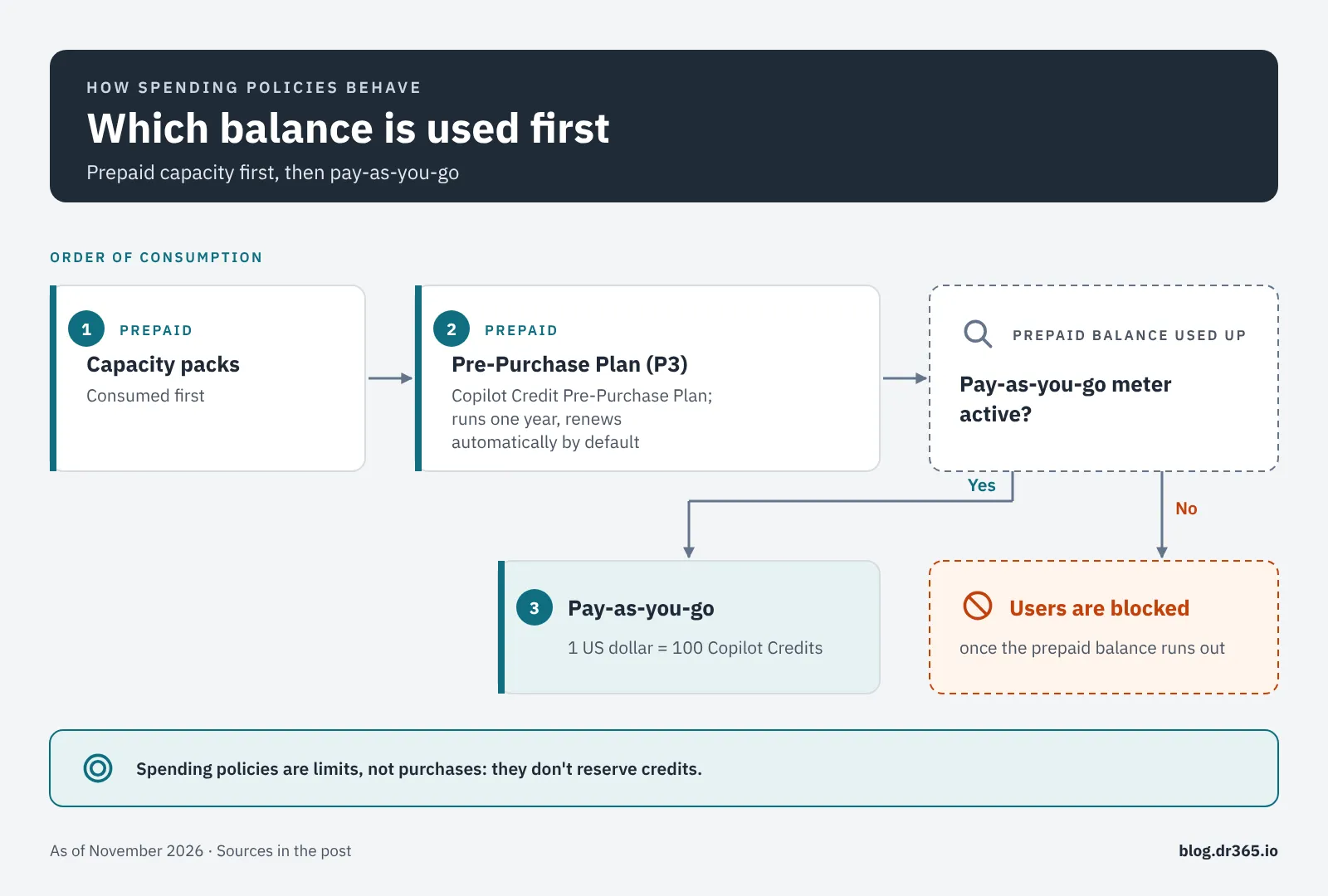
- Spending policies are limits, not purchases. They don't reserve credits, and deleting a policy refunds nothing.
- If a user is in several policies for the same service, the one with the highest per-user limit applies. Settings are not combined.
- Users who hit their limit don't fall back to another policy; they can request more credits.
- Changing groups mid-month doesn't reset consumption. Limits reset on the first of the month.
- Prepaid capacity is consumed first: capacity packs, then the Copilot Credit Pre-Purchase Plan (P3), then pay-as-you-go. Without an active pay-as-you-go meter, users are blocked once the prepaid balance runs out.
- A P3 runs for one year and renews automatically by default (Microsoft Learn).
What I would put in the blueprint
- Settle ownership before you turn anything on. Who owns the budget, who receives the alerts, who approves credit requests? Microsoft provides reader roles so finance and license management can see consumption without being able to change policies.
- Turn off auto-apply for broad policies. New services get added only after a deliberate decision. I would make the check against the list of billed services part of the monthly Message Center review.
- Cut policies by purpose instead of one for everything. A broad runtime policy with a low limit for Managed Runtime apps, one for makers in Cowork and Copilot Code, one for Teams features such as interpretation and voicemail triage.
- Always set a per-user limit, so a single agent or experiment can't drain a department's budget.
- Publish a path for credit requests. Tight limits without a request process produce tickets, not control.
- Split billing by cost center through Azure subscriptions or resource groups, as long as the invoice doesn't break costs down by service.
- Review Teams policies: set
AIInterpreterin meeting policies and AI triage in voicemail policies deliberately. - Review Dataverse environments: enable bulk processing only where it is needed, and keep the import review on.
My take
I think it is fundamentally right that Microsoft bills agentic work by consumption. A flat fee that treats hour-long agent runs the same as a chat summary wouldn't serve anyone in the long run. The problem is the defaults. Auto-apply is on, Teams features are enabled by policy, and the list of billed services grows with every release. For organizations in regulated industries, cost control is part of governance, just like permissions or data access. That is why the spending policy belongs in the tenant blueprint, not in a spreadsheet that finance looks at once a quarter.
Sources
- Microsoft Learn: Understand usage-based billing and cost management for Copilot Credits
- Microsoft Learn: Managing AI experiences enabled by usage-based billing
- Microsoft Learn: User subscription license (USL) and usage-based billing (UBB)
- Microsoft Learn: Manage licensing and Copilot Credits for apps on Copilot Managed Runtime
- Microsoft Learn: Copilot Managed Runtime licensing FAQ
- Microsoft Learn: Fabric integration with Copilot Managed Runtime
- Microsoft Learn: Manage Interpreter agent for your organization
- Microsoft Learn: Set up Cloud Voicemail
- Microsoft Learn: Prompt columns
- MC1488488: Bulk generate prompt column values for existing records
- Microsoft Learn: Usage-based billing in the Microsoft 365 admin center vs. your Azure bill
- Microsoft Learn: Optimize Copilot Credit costs with a pre-purchase plan
- Microsoft Learn: Manage Copilot Credits and capacity for Copilot Studio
- MC1560920: Copilot video creation in Clipchamp Video Hub
- MC1518034: Admin control for Clipchamp AI video creation
- Microsoft Learn: Get started with Opal in Microsoft Copilot
- MC1560916: GPT-6.2 Sol and Astra rolling out
- MC1558020: Reporting API for Copilot Credits (preview)
- Microsoft Learn: Download Copilot Credit usage reports programmatically (preview)
- recursion.no: What a Copilot Managed Runtime app costs