
Until now, things were simple for European tenants: Anthropic's Claude models are off by default in Copilot because their processing happens outside the EU Data Boundary. If you wanted Claude, you had to turn it on deliberately. MC1546438 changes both. Processing moves into the EU Data Boundary in early December, and on December 9, 2026, Microsoft turns Claude on for all users in tenants that haven't made a selection yet (MC1546438).
I think the move into the EU Data Boundary is good news. It removes the main reason to exclude Claude in the EU. The deadline has a trap, though, and it hits exactly the tenants that chose cautiously.
Two changes worth keeping apart
First: data processing. In early December 2026, processing for Claude models in Copilot moves into the EU Data Boundary for eligible tenants in the EU and EFTA. Anthropic remains a Microsoft subprocessor. If you already use Claude, you don't need to do anything; processing moves automatically once available.
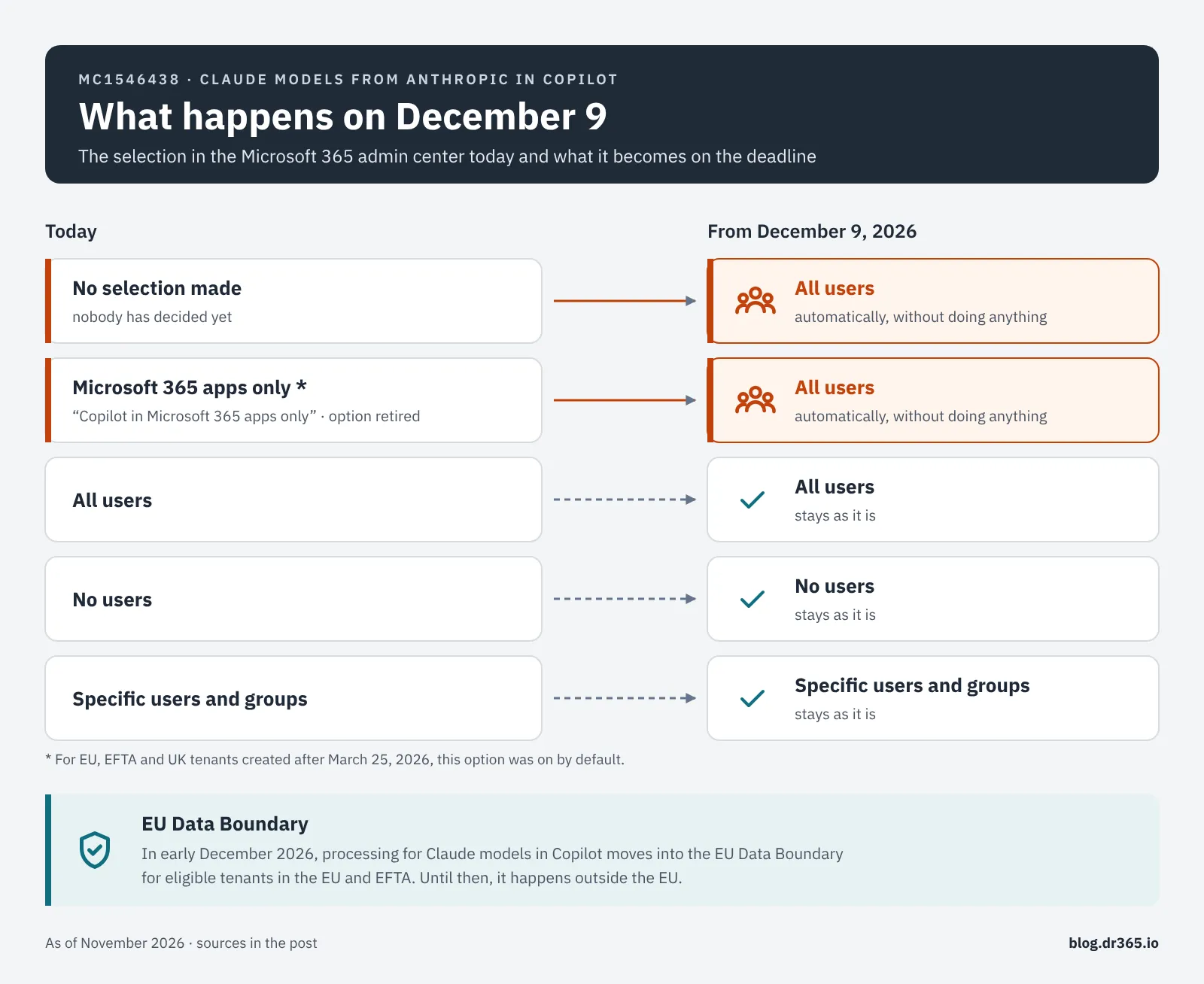
Second: the default. On December 9, 2026, Claude models are enabled for all users in tenants that haven't made an Anthropic selection. At the same time, Microsoft retires the option to allow Claude only in Copilot in the Microsoft 365 apps.
Until then, Claude isn't covered by the EU Data Boundary. According to current documentation, Claude models in Copilot, Researcher, Copilot Studio, Power Platform and Copilot in the Microsoft 365 apps are currently excluded (Microsoft Learn). Turn Claude on today and processing happens outside the EU until the switch.
The trap: "Microsoft 365 apps only" becomes "All users"
Many EU tenants didn't open Claude up fully, only for Copilot in Word, Excel and PowerPoint. That option disappears on December 9. According to the message, tenants set to "Copilot in Microsoft 365 apps only" move to All users automatically (MC1546438). If you deliberately chose a narrow setting, you get the broadest one without doing anything.
There's a detail that's easy to miss: for EU, EFTA and UK tenants created after March 25, 2026, the apps-only option was on by default, according to Microsoft (Microsoft Learn). In those tenants, often nobody actively decided anything. They still end up at "All users" on the deadline.
The selections All users, No users and Specific users and groups stay as they are.
What the EU Data Boundary covers here, and what it doesn't
The message covers the EU and EFTA; the UK isn't mentioned. Anthropic models with Data Retention use a separate setting and aren't part of this change. Microsoft says Anthropic's separate commercial terms and data processing agreement apply to them (Microsoft Learn).
For Copilot Studio and Power Platform, additional controls in the Power Platform admin center become available once Anthropic is enabled in the Microsoft 365 admin center. If you don't want Claude there, control it there as well.
One neighboring setting belongs in the same review: flex routing. Since April 17, 2026, it has been on by default for EU and EFTA tenants and allows inferencing outside the EU during peak demand (MC1269223). If you use the EU Data Boundary as the argument for Claude, know where flex routing stands in your tenant.
The operator's view
In regulated environments, the question is rarely "Claude, yes or no". It's about having a documented decision before a default replaces it. I'd get three things done before December 9.
Decide deliberately and record it
Don't let the deadline decide for you. Actively set one of the three remaining options in every tenant. If you still want to assess, choose Specific users and groups with a pilot group, or No users, for now. Both can be changed at any time after December 9. Record the decision with a date and rationale in the documentation auditors ask for.
Update your data protection records
Even if Anthropic is already listed as a subprocessor, actual processing changes for many tenants on December 9. That affects the record of processing activities and, where it exists, the data protection impact assessment for Copilot. Many customers also need to involve the works council when the scope of an AI tool changes. That takes lead time; three weeks is tight.
Check every tenant, not just your own
The setting is per tenant. If you're a service provider managing several customer tenants, check each one. Tenants created after March 25, 2026 are especially likely to be on the apps-only option and flip to "All users" on the deadline. Changing the setting requires AI Administrator or Global Administrator.
Five things to check tomorrow
- In the Microsoft 365 admin center, open Copilot › Settings › View all › AI providers operating as Microsoft subprocessors › Anthropic and note the current selection.
- If it says "Copilot in Microsoft 365 apps only" or nothing has been set, decide actively by December 9: No users, Specific users and groups or All users.
- Check in the Power Platform admin center whether external models are allowed for Copilot Studio, and whether that matches your decision.
- Check the flex routing setting in the same tenant.
- Update the record of processing activities and the DPIA, and inform the works council if anything changes for users.
Sources
- MC1546438: Claude models in Copilot are coming into the EU Data Boundary and will be enabled by default (merill.net archive)
- Microsoft Learn: Claude models from Anthropic in Microsoft Online Services
- Microsoft Learn: Copilot in Microsoft 365 apps with Anthropic models
- MC1269223: Enabling Flex Routing in the EU and EFTA (itelio)