Three requests arrive in the same week. HR wants an agent that answers questions about the travel expense policy. The service desk wants an agent that creates tickets in the ITSM tool. Legal wants an agent that checks supplier contracts against a clause library and flags deviations. All three are “an agent”, and in most tenants the same person could build all three on the same afternoon.
The governance questions behind them are very different, and the choice of tool answers many of them before anyone writes a policy. That is why this series starts here, before lifecycle, runtime controls and compliance. Microsoft recently described how it enables agent creation in its own tenant (Microsoft Inside Track). I use that guide as a starting point, but I read it from a different seat: that of an operator in a regulated environment, usually with several tenants and an IT service provider in the picture.
Three tools, three kinds of builders
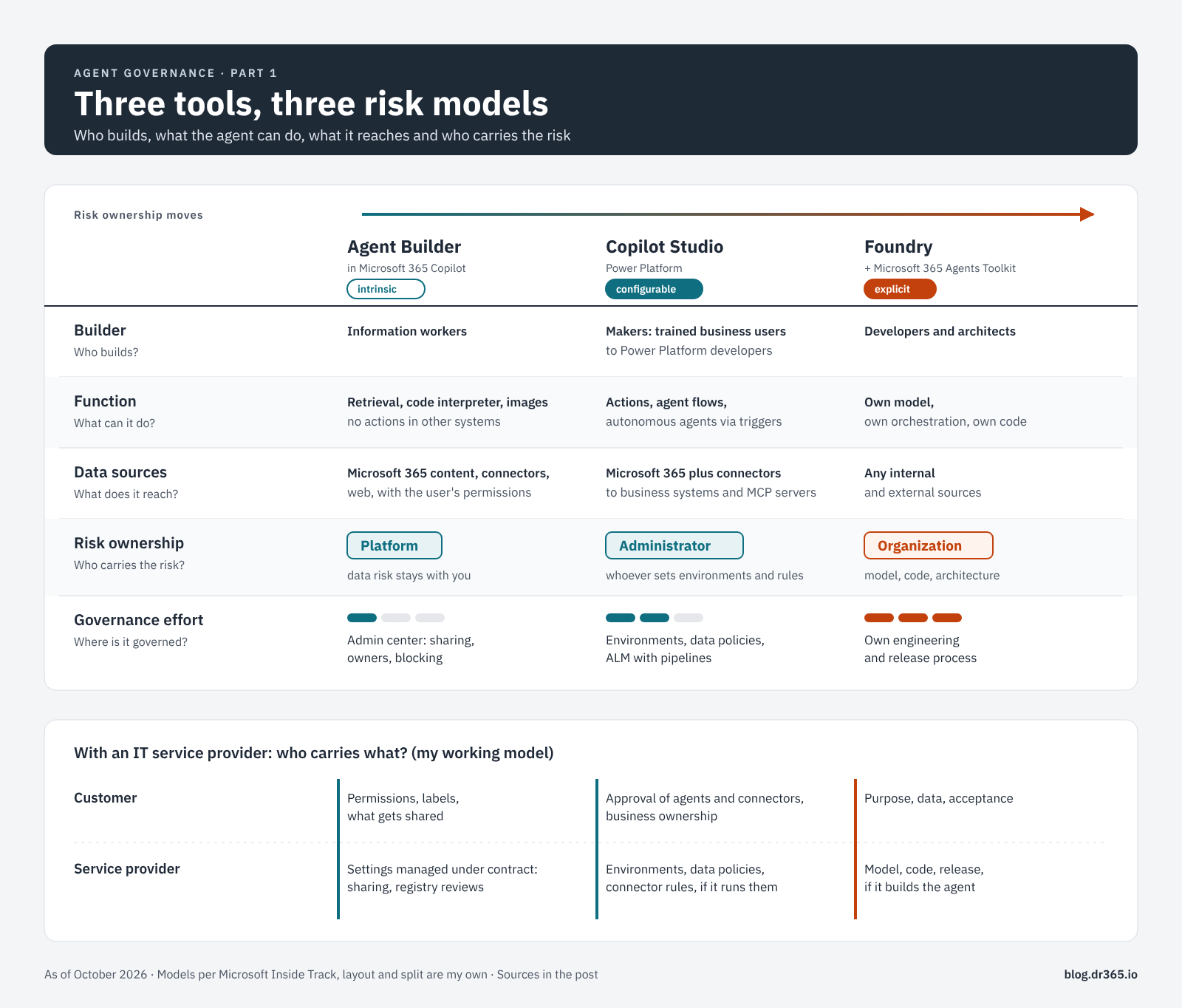
Agent Builder in Microsoft 365 Copilot is for information workers. Its agents answer questions from content the user can already reach: SharePoint, OneDrive, email, Teams messages, Copilot connectors, Dataverse or the web. Code interpreter and image generation are built in, so “retrieval only” is not quite accurate. What Agent Builder cannot do is call external services. There are no actions, connectors or workflows, and Microsoft’s answer for those is to copy the agent to Copilot Studio (Microsoft Learn).
Copilot Studio is for makers, from trained business users to Power Platform developers. Agents reach other systems through connectors, run agent flows with approvals, react to triggers as autonomous agents and call other agents. Governance lives in Power Platform environments: data policies, separate development, test and production environments, and admin approval before an agent is published to the organization (Microsoft Learn).
Microsoft Foundry and the Microsoft 365 Agents Toolkit are for developers. In Foundry, the team picks the model, writes the orchestration and runs the agent as hosted code with its own Entra identity (Microsoft Learn). The Agents Toolkit in Visual Studio Code builds both declarative agents, which use the Copilot orchestrator just like Agent Builder agents, and custom engine agents with their own orchestration (Microsoft Learn). So the tool alone does not decide who carries the risk. The architecture does.
Who carries the risk?
Microsoft’s guide sorts the three tools by who owns the risk. Agent Builder has intrinsic governance: the platform carries the risk, because the agent stays inside existing Microsoft 365 boundaries. Copilot Studio has configurable governance: the administrator carries the risk, because connectors, flows and data movement need rules. Foundry has explicit governance: the organization carries the risk, because it decides on model, orchestration and architecture.
I find the distinction useful, with one caveat for the first model. “The platform carries the risk” describes the technical boundary. Agent Builder grants no new permissions and only uses content the user can already see (Microsoft Learn). The data risk stays with you: an agent on top of an overshared SharePoint site makes the oversharing easier to find. In addition, every user may share Agent Builder agents with the whole organization by default, and sharing an agent can share the underlying SharePoint files at the same time (Microsoft Learn). The platform sets the boundaries. Whether the data inside them is in order remains your job.
Microsoft’s zone model for Copilot Studio governance follows the same line: zone 1 for Agent Builder and SharePoint agents with read-only access, zone 2 for Copilot Studio, zone 3 for professional development with Foundry and Copilot Studio (Microsoft Learn). Part 2 builds on these zones.
Questions to answer before anyone builds
Microsoft’s guide lists questions for builders. I use a slightly different set, because operators need one more:
- Goal: what should the agent achieve, and how will you notice that it works?
- Data: which sources does it need, and are they personal, team or enterprise data? The classification matters as much as the location.
- Mode: should it retrieve information, act in other systems or run on its own? Retrieval fits Agent Builder. Actions mean Copilot Studio at the latest. Autonomous agents without a signed-in user shift most of the risk into configuration.
- Reach: an agent shared with five colleagues and one in the organization’s catalog are different products.
- Operation: who runs the agent after go-live, and in which tenant? This is the question I see missing most often. It decides who keeps knowledge sources current, who reviews permissions and who switches the agent off.
The operator’s view
Microsoft describes one very large tenant with its own CISO office, an internal hub for builders and a team that measures maker friction. According to Microsoft, monthly active makers grew from about 2,000 to 20,000, about 150,000 personal development environments are under governance, and measured maker friction fell from roughly 50 to 5 percent (Microsoft Inside Track). These are figures from Microsoft’s own tenant. I would not use them as a benchmark for a utility with 3,000 employees.
In regulated environments with a service provider, three things change.
The administrator often works for someone else
Service providers usually hold admin roles in customer tenants through GDAP, scoped and time-bound. Microsoft now offers multi-tenant agent management in the Microsoft 365 admin center, currently in preview. With the AI Administrator role, a provider can view, install and block agents across all governed tenants from one place. Risk signals and activity data require Agent 365 licenses (Microsoft Learn). That helps, and it makes one question more pressing: if the configurable model puts the risk on “the administrator”, which administrator is meant?
The three models split between customer and provider
My working model, not Microsoft’s:
| Model | Customer | Service provider |
|---|---|---|
| Intrinsic (Agent Builder) | Data risk: permissions, labels, what gets shared | The settings it manages under contract, such as sharing controls and registry reviews |
| Configurable (Copilot Studio) | Approval of agents and connectors, business ownership | Environments, data policies and connector rules, if it designs and runs them |
| Explicit (Foundry) | Purpose, data and acceptance | Model, code and release process, if it builds the agent |
The second row is where contracts are usually vague. The service description should state who maintains data policies and how quickly a request to block an agent is executed. The third row has a regulatory side: a provider that builds an agent for a customer can end up in a provider role under the AI Act, depending on purpose and branding. Part 4 deals with that.
Shadow AI has a different weight
Microsoft argues that too much control does not remove risk, it pushes builders to unsanctioned tools and costs both productivity and visibility. I agree with the mechanism. In regulated environments, I draw the line by function rather than by tool. Zone 1 can stay open: Agent Builder agents on content people can already read, with org-wide sharing limited to a defined group. The hard boundary belongs where an agent acts in other systems or runs without a signed-in user. One argument also carries more weight under NIS2 than in Microsoft’s case: an agent that nobody has registered is missing from the asset inventory, and auditors ask for that inventory.
Five things to check tomorrow
- Check who may share Agent Builder agents with the whole organization. Unless someone changed it, the answer is everyone.
- Filter the agent registry by platform and count the agents per tool. That shows which risk model dominates your tenant.
- List for each customer tenant who holds the AI Administrator and Power Platform administrator roles, the customer or the provider.
- Add the operation question (who runs it, in which tenant) to your agent request form.
- Check whether your Agent 365 licensing covers the tenants where you need risk signals. Without it, the registry shows the inventory but no risks (Microsoft Learn).
How the series continues
- Part 2, lifecycle: how much lifecycle an agent needs, and how it differs between the admin center, Copilot Studio environments and a Foundry release process (part 2).
- Part 3, runtime: whose permissions an agent uses when it calls tools and other agents, and where responsibility shifts along the way (part 3).
- Part 4, compliance: who has to deliver evidence under the AI Act, GDPR, NIS2 and ISO 27001/42001, and how much of it Microsoft 365 provides (part 4).
Sources
- Microsoft Inside Track: Our Customer Zero guide to enabling agent creation across Microsoft 365 Copilot, Copilot Studio, and Foundry (Alex Fleck, October 8, 2026)
- Microsoft Learn: Choose between Agent Builder and Copilot Studio to build your agent
- Microsoft Learn: Build agents in Agent Builder
- Microsoft Learn: Share and manage agents built in Agent Builder
- Microsoft Learn: Agents in Microsoft Foundry
- Microsoft Learn: Custom engine agents for Microsoft 365 overview
- Microsoft Learn: Implement a zoned governance strategy
- Microsoft Learn: Manage agents across multiple tenants in the Microsoft 365 admin center (preview)
- Microsoft Learn: Agent registry in the Microsoft 365 admin center