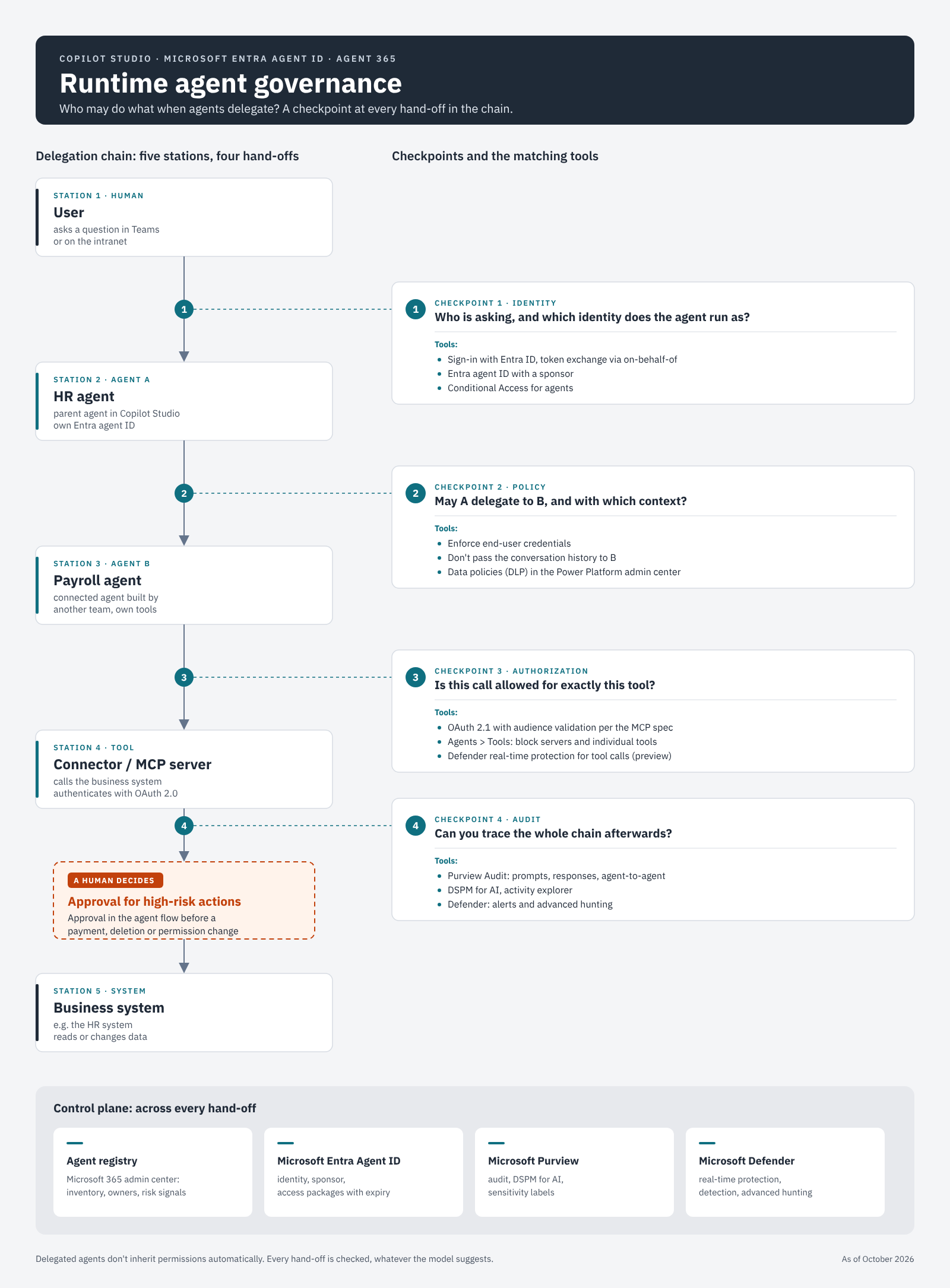
An employee asks the HR agent on the intranet how many vacation days they have left. The HR agent knows the leave policy but has no numbers, so it hands the question to a connected payroll agent that another team built. The payroll agent queries the HR system through a connector. That connector was set up with the account of the person who built the payroll agent, and that person can read every employee’s record. Whether the answer contains only the employee’s own balance or a colleague’s as well is now up to the language model.
On paper, nothing is wrong here. Both agents have an owner, both are registered and approved. The question of whose permissions the second agent uses only comes up at the moment of the call, and that moment is what this post is about.
Design time and runtime
Part 2 covered governance at design time: three zones, seven phases, an owner for every agent and a Go, Change, Hold or Stop decision. Those decisions are made once, before an agent goes into production.
At runtime, the agent decides with every request which tool to call, which other agent to involve and what data to pass along. A language model makes those decisions. For me, runtime governance means that identity, policy, authorization and logging apply at each of these hand-offs, whatever the model suggests.
Part 1 maps the tools to three models: with Agent Builder the platform carries the risk, with Copilot Studio the administrator, with Foundry the organization. At runtime that mapping becomes concrete, and in places it shifts. Agent Builder agents do not call external services, so their runtime risk is the user’s permissions. In Copilot Studio, responsibility arises at every single tool. A maker who enters their own credentials takes part of the risk off the administrator’s desk and onto their own. With Foundry, the organization builds the controls itself, for example guardrails that inspect tool calls and tool responses (preview) (Microsoft Learn). This post focuses on Copilot Studio, because that is where most hand-offs can be configured.
Signing in to the first agent is not enough
A user signing in to the HR agent tells you nothing about what the payroll agent two steps further down may do. The user’s identity has to travel all the way to the business system. In Copilot Studio, each tool decides this on its own: it uses either the end user’s credentials or the maker’s. End-user credentials are the default, and the automatic security scan warns the maker before publishing if they switch it (Microsoft Learn).
Admins can turn off maker-provided credentials per environment or environment group in the Power Platform admin center (Microsoft Learn). Every action then runs as the person who is asking. The trade-off is real: autonomous agents that start on a schedule or an event without a signed-in user fail in those environments. I would enforce the setting in production environments for zone 2 and zone 3 agents and give autonomous agents a separate environment with its own rules.
Entra calls the same pattern on-behalf-of. The agent exchanges the user’s token for a new one issued for the target resource, and Conditional Access evaluates that exchange (Microsoft Learn). The agent also has an identity of its own. Since May 2026, new Copilot Studio agents get a Microsoft Entra Agent ID automatically: at creation in the standard harness, on first publish in the GitHub Copilot harness. The agent owner is added as its sponsor (Microsoft Learn).
Keep enforcement out of the prompt
The model picks the next tool, and a crafted email or a poisoned document in a knowledge source can influence that choice. A rule that only lives in the agent’s instructions (“never return salary data”) is therefore a request to the model. Enforcement has to happen somewhere the model cannot talk its way past.
Microsoft 365 offers several layers for this. Data policies in the Power Platform admin center define which connectors an agent may use, and the connector platform checks them again on every call (Microsoft Learn). Conditional Access evaluates tokens for agent identities. Microsoft Defender can inspect and block tool calls from Copilot Studio agents in real time, currently in preview (Microsoft Learn). Under the hood, the agent asks an external service for a verdict before each tool call. If no answer arrives within one second, Copilot Studio allows the call by default. In a regulated environment I would switch the error behavior to block (Microsoft Learn).
Limit context on purpose
What an agent passes on matters as much as what it retrieves. In Copilot Studio, a child agent always receives the parent’s context. For a connected agent you can turn off passing the conversation history, so it only receives the specific task (Microsoft Learn). That is what I would do in the example. The payroll agent needs the question about vacation days. It has no business seeing the earlier part of the chat where the employee may have mentioned being ill.
On the data side, the familiar controls apply. Copilot Studio only returns content the user can access, and for files encrypted by a sensitivity label the user also needs the EXTRACT usage right (Microsoft Learn). That protection depends on the query running with the user’s permissions. A tool that uses maker credentials sees whatever the maker sees.
Treat an MCP server like an API
The Model Context Protocol (MCP) defines how an agent discovers and calls tools. Authorization is explicitly optional in the specification. When a server implements it, the server acts as an OAuth 2.1 resource server: it must check that a token was issued for it and must not accept or pass on any other tokens (MCP specification). Whether a given server actually does that depends on its code. So I treat every MCP server like a third-party API and ask who runs it, what data it sees, how it authenticates and who approves it.
Copilot Studio connects MCP servers through a wizard that offers no authentication, an API key or OAuth 2.0. Because access runs through Power Platform connectors under the hood, data policies cover MCP servers too (Microsoft Learn). Agent 365 adds a second layer. Under Agents > Tools in the Microsoft 365 admin center, admins can block an MCP server for the whole organization. For supported servers, individual tools can be switched off as well, for example write and delete operations, while read operations stay available. This tool-level control is still rolling out and is enforced at runtime by the Agent 365 Tooling Gateway (Microsoft Learn).
The control plane: registry, identity, protection, audit
The tools so far live in several portals. The agent registry in the Microsoft 365 admin center pulls them together. Agent 365 has been generally available since May 1, 2026, and is licensed per user (Microsoft Learn). The registry lists agents from all platforms, including those registered in Entra, and with the right license it consolidates risk signals from Purview, Entra and Defender for each agent (Microsoft Learn).
Entra Agent ID provides the identity, with a sponsor, Conditional Access and ID Protection for agents. Purview captures prompts and responses in the unified audit log and surfaces them in DSPM for AI. For Agent 365 that explicitly includes agent-to-tool and agent-to-agent interactions (Microsoft Learn). Check licensing carefully. Conditional Access for agents requires Microsoft 365 E7, or Agent 365 together with at least Entra ID P1 or Microsoft 365 E3 (Microsoft Learn). Licensing terms change often, so verify the current version before you roll out.
Delegation without inherited permissions
Back to the payroll agent. Microsoft’s own guidance on multi-agent patterns says that a connected agent might have access to things the parent agent doesn’t, and that calling it should be treated like any other powerful action (Microsoft Learn). I turn that into three rules.
First, every tool in a connected agent uses end-user credentials unless there is a documented reason not to. Second, the setting “Let other agents connect to and use this one” stays off unless an agent is explicitly meant to be a building block. By default, any agent in the same environment can connect to it (Microsoft Learn). Third, agents with their own identity receive permissions through access packages with an expiry date. The sponsor is notified before access expires and has to request an extension actively. This is still in preview (Microsoft Learn).
Human approval for high-impact actions
Some actions no agent should take alone: payments, changes to master data, deleting records, changing permissions. Agent flows in Copilot Studio include human-in-the-loop actions for approvals and requests for information (Microsoft Learn). Multistage approvals combine manual stages with AI stages and conditions in between, but they are still in preview (Microsoft Learn). An AI stage can pre-sort routine cases. For high-impact actions I would always end with a human stage, so that the decision belongs to a named person.
Where the approval sits matters most. It belongs in the flow that performs the action. If it only exists in the agent’s instructions, the model decides once again whether to ask at all.
What this means for regulated environments
Organizations in scope of NIS2 in Germany must, under section 30 of the BSI Act (BSIG), among other things set up access control concepts and use multi-factor or continuous authentication (§ 30 BSIG). The law does not mention agents. I see no reason to treat an agent that reads from the HR system differently from a service account that does the same. That is my professional view, not legal advice.
For traceability, every action has to answer three questions: which user triggered it, which agents were involved, and under which identity the business system was called. The unified audit log covers a large part of this. Connected agents, however, produce separate transcripts that you have to correlate through identifiers in the telemetry (Microsoft Learn). If you may have to report an incident on a short deadline, build that query before you need it.
For recertification, agent identities belong in the same review cycle as service accounts. Sponsors and access packages with an expiry date make that possible in Entra, without anyone maintaining a spreadsheet.
A service provider adds one more question: who operates the runtime controls? Data policies, Conditional Access for agents and Defender real-time protection rules often sit with the provider, while approvals in agent flows sit with the customer’s business owners. Defender can, for example, block a tool call that would send email to an unsafe domain (Microsoft Learn). Who sees that alert at night, and who may then block the agent, has to be settled in advance. Multi-tenant agent management in the Microsoft 365 admin center (preview) makes blocking across tenants technically easy (Microsoft Learn). The authority to do it belongs in the contract.
Where Microsoft still has gaps
Conditional Access on the agent identity is currently evaluated only when a Copilot Studio agent runs in Microsoft Teams. Other channels still call connectors through the existing Power Platform flow (Microsoft Learn). On top of that, custom connectors, MCP servers and REST tools add no API permissions to the agent ID, so the Entra view is incomplete exactly where MCP comes in. Agent Builder agents get no agent ID at all.
The documentation does not describe how identity is passed from a parent agent to a connected agent. For the standard harness it only says that, depending on the authentication setup, you might need to share the connected agent with the end users as well. I would test this in my own tenant before relying on it. Several of the runtime controls above are also still in preview or rolling out, including Defender real-time protection for Copilot Studio, multistage approvals and tool-level blocking for MCP servers.
Five things you can check tomorrow
- Check in the Power Platform admin center whether your production environments still allow maker-provided credentials. The agent inventory shows in the
connectionProviderfield (preview) which connector operations use them. - For your most important agent, list every connected agent and child agent and find out whether each one receives the conversation history.
- Open Agents > Tools in the Microsoft 365 admin center and block every MCP server whose operator you don’t know.
- Check in the Microsoft Entra admin center that every agent identity has a sponsor.
- Pick one high-impact action an agent can perform today and put an approval into the flow in front of it.
Which frameworks you have to prove agent governance against, and who delivers which evidence, is the topic of part 4.
Sources
- Microsoft Learn: Agent identities and authentication for Copilot Studio
- Microsoft Learn: Control maker-provided credentials for authentication
- Microsoft Learn: Automatic security scan in Copilot Studio
- Microsoft Learn: Conditional Access for agents
- Microsoft Learn: Multi-agent orchestration patterns and best practices
- Microsoft Learn: Connect to an existing Copilot Studio agent
- Microsoft Learn: Connect your agent to an existing MCP server
- Microsoft Learn: Manage plugins, skills, and MCP servers
- Microsoft Learn: Enable external threat detection for Copilot Studio agents
- Microsoft Learn: Protect AI agents in real time using Microsoft Defender
- Microsoft Learn: Guardrails and controls in Microsoft Foundry
- Microsoft Learn: Manage agents across multiple tenants (preview)
- Microsoft Learn: Purview for Copilot Studio
- Microsoft Learn: Purview for Microsoft Agent 365
- Microsoft Learn: Overview of Microsoft Agent 365
- Microsoft Learn: Manage agent registry in the Microsoft 365 admin center
- Microsoft Learn: Governing agent identities
- Microsoft Learn: Agent flows overview
- Microsoft Learn: Multistage and AI approvals in agent flows
- Microsoft Learn: Copilot Studio agent inventory
- Model Context Protocol: Authorization (specification 2026-07-28)
- Section 30 BSIG: risk management measures (German)
This post was prompted by a LinkedIn post from Rajeev Yadav.