This series has been extendedIn October 2026 this series gained an introductory part. This post was originally part 1 and is now part 2. Part 1 sorts Agent Builder, Copilot Studio and Foundry by who carries the risk.
Building an agent with Agent Builder in Microsoft 365 Copilot takes a few minutes. Getting rid of it takes forever in many tenants, because nobody feels responsible. The colleague who built an agent for the travel expense policy last spring has moved to another department. The agent keeps answering questions anyway, based on a policy that has been out of date since July.
That is the problem an agent lifecycle solves. In this post I describe how I would set up a lifecycle for agents built with Agent Builder and Copilot Studio, and which tools Microsoft now provides for it. My take: not every agent needs the full process. Every agent does need an owner, and that only works for agents that are registered. What does not show up in the agent registry cannot be assigned to a person, reviewed or switched off.
The lifecycle by platform
Part 1 covers which tool fits which builder and who carries the risk. For the lifecycle, the phases stay the same, but where they happen depends on the platform.
IT manages Agent Builder agents (intrinsic model, the platform sets the boundaries) in the Microsoft 365 admin center: visibility, sharing, owners, blocking and deletion. There are no versions and no environments, so the lifecycle here is mostly about sharing, ownership and cleanup.
Copilot Studio (configurable model, the administrator sets the rules) uses application lifecycle management with separate development, test and production environments. Data policies, connector rules and publishing approval are tied to those environments (Microsoft Learn).
Foundry (explicit model, the organization owns model and code) follows your own engineering process: versioning, evaluation and publishing run through the development team’s tools and pipelines (Microsoft Learn). Published Foundry agents appear in the agent registry, and admins can stop them there (Microsoft Learn). The rest of this post focuses on Agent Builder and Copilot Studio. Foundry goes through the same phases, implemented with conventional software engineering.
The bridge between Agent Builder and Copilot Studio is the copy feature: an agent from Microsoft 365 Copilot can be copied to Copilot Studio once it needs more than a personal helper can offer. In lifecycle terms, that is the moment an agent changes zones.
Three zones instead of one process for everything
A single approval process for every agent fails on two sides. An IT review is overkill for the personal agent that summarizes my own meeting notes. A click on “Share” is not enough for an agent that answers payroll questions for 3,000 employees.
Microsoft addresses this with a zone model (Microsoft Learn). In zone 1, anyone can build agents for personal or team productivity, grounded in content they can already access. In zone 2, makers approved by IT build agents for other teams. These agents go through an IT review and are deployed to environments that IT manages. Zone 3 is reserved for organization-wide agents that are treated like any other enterprise application. The current whitepaper Administering and Governing Agents is now structured along the same personal, team and enterprise levels.
Microsoft now maps tools to zones more tightly: zone 1 for Agent Builder and SharePoint agents, zone 2 for Copilot Studio, zone 3 for Foundry and Copilot Studio in professional development. I still allow Agent Builder agents in zone 2 as long as they only read content the team can already access. For me, reach decides the zone, not the tool.
For the lifecycle, the zone decides how many phases an agent goes through and how strict they are. An agent in zone 1 takes the short path. As soon as its reach, data access or criticality grows, it moves to the next zone and into a stricter process.
The seven phases at a glance
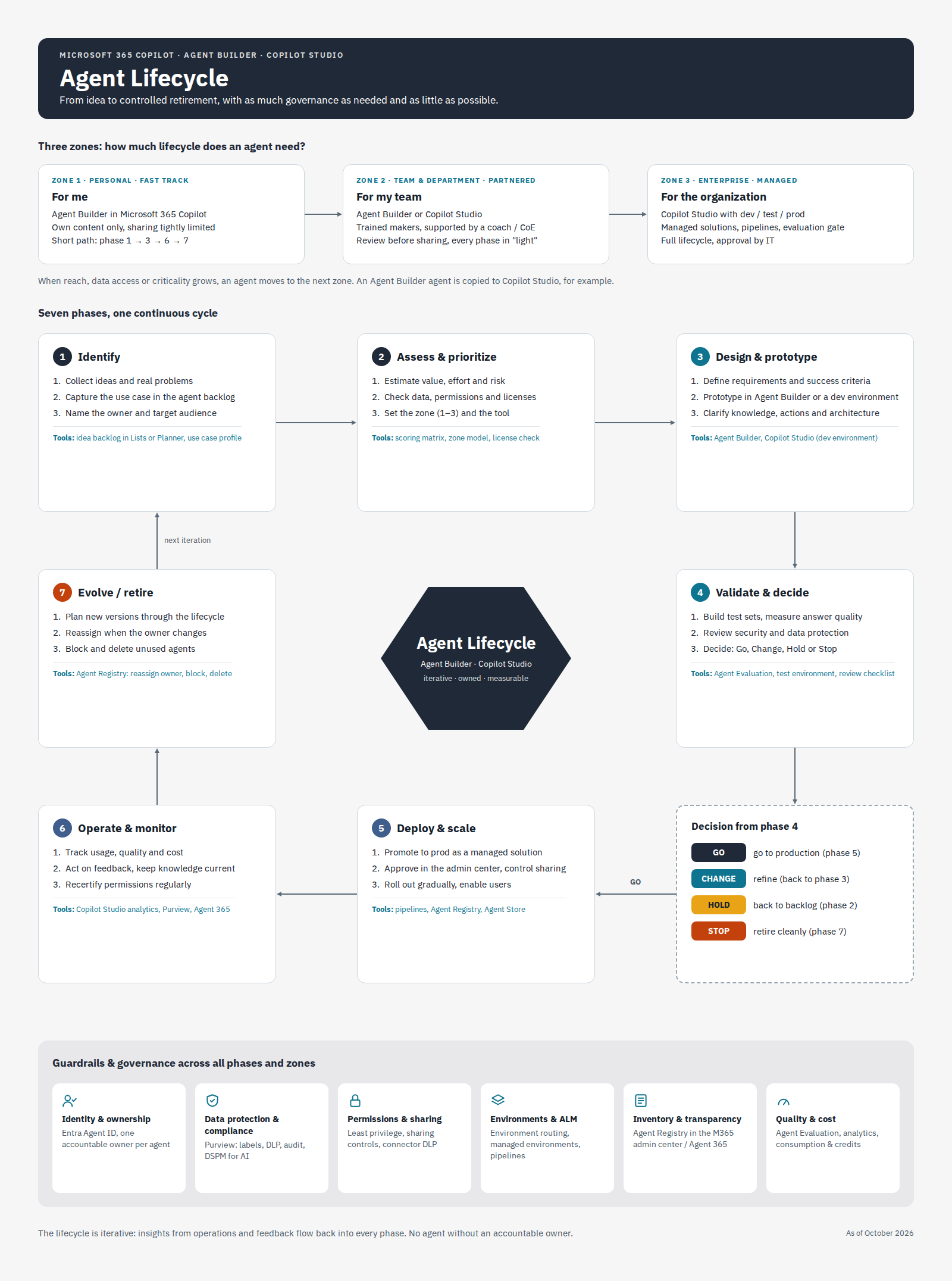
The diagram builds on a lifecycle model that has been circulating online. I extended it with the zones, the specific Microsoft tools for each phase and a separate decision gate.
1. Identify
Everything starts with a real problem. Ideas go into a backlog, for example a SharePoint list or a Planner board. Each idea gets a short profile with the problem, the target audience and an accountable owner. Without an owner, the idea goes no further.
2. Assess and prioritize
This is where the most important decision of the whole lifecycle happens: which zone does the agent belong in? I look at value and effort, but mostly at the data. Which knowledge sources will the agent use, who is allowed to read them, and should the agent trigger actions in other systems? The answers also determine the tool. Agent Builder covers many zone 1 and 2 scenarios. Once actions, connectors to line-of-business apps or a broad rollout come into play, the path leads to Copilot Studio. If the agent needs its own model or orchestration, it ends up in Foundry and in the development team’s process.
3. Design and prototype
Success criteria come before building. What does the agent need to answer, and how will I know it does that well? Only then does a prototype take shape: directly in Agent Builder for zone 1, in a Copilot Studio development environment for zones 2 and 3. Microsoft recommends environment routing to send makers to personal developer environments automatically, so not everything ends up in the default environment (Microsoft Learn).
4. Validate and decide
This phase finally has a proper tool. Agent Evaluation in Copilot Studio has been generally available since the end of March. It lets you create test sets, choose evaluation methods and repeat runs across agent versions. A Power Automate connector and a REST API (currently in preview) make it possible to include evaluations in CI/CD pipelines (Microsoft Learn).
Security and data protection belong in this phase too: which data can the agent see, which identity does it run under, and do its permissions match the intended audience? If the agent calls other agents or tools, add a second question: do they act with the user’s permissions or with their own, possibly broader credentials? In Copilot Studio this is set per tool, and a connected agent does not inherit the setting of the agent that calls it. The phase ends with a deliberate decision.
The gate: Go, Change, Hold or Stop
The decision after phase 4 has four possible outcomes. Go leads to production. Change sends the agent back to phase 3 because quality or design still fall short. Hold parks it in the backlog, for example because a data source is not yet properly permissioned. Stop ends the idea in a controlled way.
Many organizations underestimate Stop. An agent that fails its tests should not stay in the tenant as a half-finished prototype.
5. Deploy and scale
In zone 3, nobody edits an agent directly in production. Microsoft recommends packaging agents as managed solutions and promoting them from development through test to production with Power Platform pipelines (Microsoft Copilot Blog). That gives you versioning, an auditable change history and the option to roll back.
Publishing to the organization runs through the Microsoft 365 admin center, where admins can approve or reject submitted agents. A gradual rollout follows. User training belongs in the same plan, otherwise even a good agent goes unused.
6. Operate and monitor
Operations is about usage, quality and cost. Copilot Studio provides analytics, Purview covers audit and data protection, and since May 2026 Agent 365 adds a dedicated control plane for agents. Copilot Studio agents appear in its agent registry once they are made available in Microsoft 365. The same agent can show up more than once, for example as a shared and as a published version (Microsoft Learn). Governance actions are logged in Purview.
Two things are a fixed part of operations for me: keeping knowledge sources current so the agent does not answer from outdated documents, and recertifying permissions on a regular schedule. Anyone working with customers in regulated industries knows this principle from identity management. It applies to agents in the same way.
7. Evolve or retire
Every agent ends at some point, either as a new version or through retirement. New versions go through the lifecycle again, starting at phase 2 or 3 depending on the scope of the change.
The admin center now includes the most important actions for retirement (Microsoft Learn). Admins can assign a new owner to Agent Builder and Copilot Studio agents, even when an agent is already ownerless. The new owner gets full edit and delete permissions plus access to the previous owner’s files, and the previous owner loses all access. Agent Builder agents can now have several owners, which admins can add or remove. Agents without a future can be blocked and deleted, with a 30-day window to restore them.
Microsoft’s Zero Trust workshop sums up the idea well: a lifecycle policy that nobody enforces remains a document (Zero Trust Workshop). Without this cleanup, the number of agents only ever grows.
Guardrails across all phases
Underneath the cycle sit six topics that apply in every phase and every zone: identity and ownership, data protection and compliance, permissions and sharing, environments and ALM, inventory and transparency, and quality and cost. In the diagram I mapped each topic to the tools available for it today, from Entra Agent ID through Purview to the agent registry.
Where it still falls short
The picture is not complete yet. Agent Builder agents have no real ALM with environments and versions. If you want to run one of them seriously, moving it to Copilot Studio is hard to avoid.
Copilot Studio has gaps as well. The built-in evaluations live in the cloud, not in source control, which makes automated quality gates in a pipeline harder than in classic software development. In an ESPC webinar, Stephan Bisser presented a CLI tool that versions test cases as YAML files to close that gap.
Finally, licensing: many registry features are available in the admin center. Risk signals in the registry and the advanced security and compliance capabilities of Agent 365 require Microsoft 365 E7 or an Agent 365 license (Microsoft Learn). Clarify this before you roll out.
Five things you can check tomorrow
- Open the agent registry in the Microsoft 365 admin center and filter for agents without an owner.
- Check whether environment routing sends Copilot Studio makers to their own developer environments, or whether everyone builds in the default environment.
- Define the criteria that move an agent from zone 1 to zone 2, and write them down.
- Create a first test set in Agent Evaluation for your most important agent.
- Decide who takes over the agents of people who leave the organization.
What happens when an approved agent calls tools and hands work to other agents at runtime is the topic of part 3.
Sources
- Microsoft Learn: Choose between Microsoft 365 Copilot and Copilot Studio to build your agent
- Microsoft Learn: Implement a zoned governance strategy
- Microsoft Learn: Governance and lifecycle actions for agents in the Microsoft 365 admin center
- Microsoft Learn: Agent registry in the Microsoft 365 admin center
- Microsoft Learn: Agents in Microsoft Foundry
- Microsoft Learn: Run agent evaluations with the REST API (preview)
- Microsoft Learn: Agent registry in Agent 365
- Microsoft Tech Community: Agent Evaluation is generally available
- Microsoft whitepaper: Administering and Governing Agents